Transaction Screening
Screen transaction risk levels and process payments.
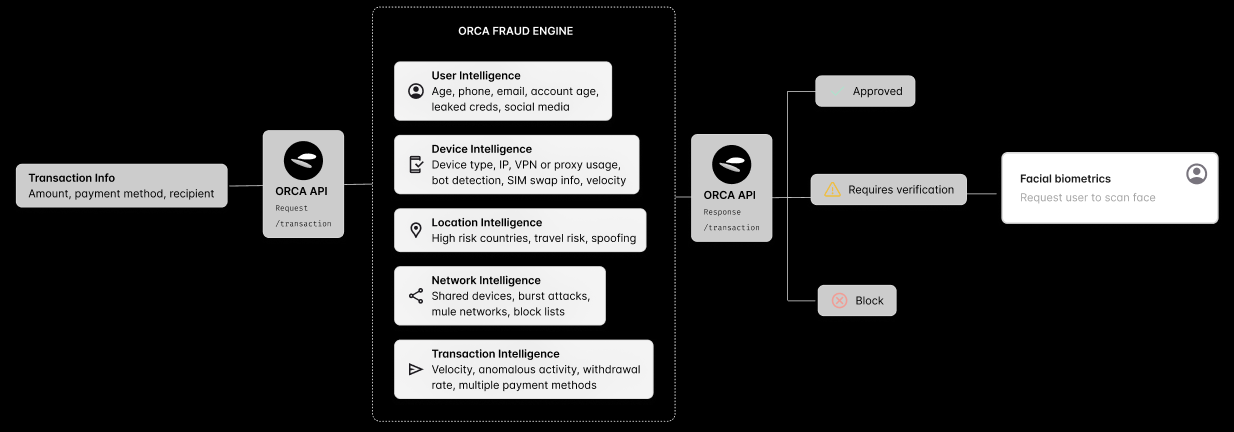
Submit Transaction
Process a new transaction and receive an immediate risk assessment. This endpoint handles various payment methods including bank transfers, card payments, and cryptocurrency transactions.
Endpoint
POST /v1/transactionRequest Schema
| Field | Type | Required | Description |
|---|---|---|---|
id | string | Yes | Unique transaction identifier |
userId | string | Conditional | User identifier. Omit if the user field is used. One of userId or user is required |
user | object | Conditional | Complete User object. Omit if the userId field is used. One of userId or user is required. The User can be sent via the /user endpoint, or using this field |
accountId | string | No | Account identifier associated with user |
status | enum | Yes | Transaction status: PENDING, APPROVED, DECLINED, BLOCKED, FAILED, CANCELED, ABANDONED, CHARGEBACK |
currencyCode | string | Yes | ISO 4217 currency code |
amount | number | Yes | Transaction amount in specified currency |
timestamp | number | Yes | Unix epoch milliseconds. Must not be in the future, and must be within the last year |
userDeviceId | string | null | No | Unique device identifier, if userDevice is sent via the /userDevice endpoint, simply refer to it’s id. Must not be sent together with userDevice. Accepts an explicit null |
userDevice | object | No | Complete user device information, if not sent via /userDevice endpoint. Must not be sent together with userDeviceId |
direction | enum | No | Payment direction: payin, payout |
actionType | string | No | Transaction type: topup, withdrawal, transfer, deposit |
provider | string | No | Payment method provider (e.g., onafriq, stripe) |
paymentMethod | enum | No | Payment method: crypto, wallet, bank, card, cash, vas, ewa |
source | string | No | Source of funds (e.g., savings, checking) |
externalId | string | No | External reference ID for transaction |
flow | string | No | Your own label for the flow this transaction belongs to, available to rules |
merchantId | string | No | Merchant identifier, where the transaction involves a merchant. Must not be sent together with merchant |
merchant | object | No | Complete Merchant object. Must not be sent together with merchantId. The Merchant can be sent via the /merchant endpoint, or using this field |
terminalId | string | No | Terminal identifier, where the transaction originated at a terminal |
billingAddress | object | No | Billing address information, see Address Schema |
recipient | object | No | Details when a single recipient differs from the sender. Must not be sent together with recipients |
recipients | array | No | Array of recipient objects, for transactions paying out to more than one party. Must not be sent together with recipient |
Payment Method Details
When paymentMethod is set, the matching object below must be present, otherwise the request is rejected:
| Field | Type | Description |
|---|---|---|
bank | object | Bank payment details |
card | object | Card payment details |
crypto | object | Cryptocurrency payment details |
wallet | object | Digital wallet payment details |
cash | object | Cash payment details |
ewa | object | Earned Wage Advance (EWA) payment details |
vas | object | Value Added Services (VAS) payment details |
The details specific to each payment method can be found in the Payment Method Schemas section below.
Recipient Details
There is also a
recipientobject which is only necessary if the recipient is different from the originating user
When sending funds to another party, include recipient information:
A recipient accepts every field of the User Schema — id, firstName,
lastName, dateOfBirth, address, phone, email, documents, kycDetail, amlDetail and the
rest, all optional — plus the recipient-specific fields below. Recipient identity and KYC data feeds
counterparty rules, so send what you have.
| Field | Type | Description |
|---|---|---|
recipient.id | string | Recipient identifier |
recipient.amount | number | Amount for this recipient, where it differs from the transaction amount. Useful with recipients |
recipient.currencyCode | string | ISO 4217 currency code for this recipient, where it differs from the transaction currency |
recipient.paymentMethod | enum | Recipient payment method: crypto, wallet, bank, card, cash, vas, ewa |
recipient.bank | object | Recipient bank details |
recipient.card | object | Recipient card details |
recipient.crypto | object | Recipient crypto details |
recipient.wallet | object | Recipient wallet details |
recipient.cash | object | Recipient cash details |
recipient.vas | object | Recipient VAS details |
recipient.ewa | object | Recipient EWA details |
As with the transaction itself, when
recipient.paymentMethodis set the matching object must be present, otherwise the request is rejected.
The same fields apply to each entry of the recipients array.
Example Request
{
  "id": "TXN123",
  "userId": "USER123",
  "accountId": "ACCT123",
  "status": "PENDING",
  "currencyCode": "ZAR",
  "amount": 1000.00,
  "direction": "payout",
  "actionType": "withdrawal",
  "source": "savings",
  "provider": "dlocal",
  "paymentMethod": "bank",
  "bank": {
    "accountNumber": "1234567890",
    "bankCode": "051001",
    "branchCode": "123456",
    "accountType": "checking",
    "accountHolderName": "John Doe"
  },
  "billingAddress": {
    "street": "123 Main St",
    "city": "Cape Town",
    "country": "ZA",
    "postalCode": "8001"
  },
  "timestamp": 1734167723000,
  "externalId": "EXT789",
  "userDeviceId": "DEVICE123"
}
Response Schema
| Field | Type | Required | Description |
|---|---|---|---|
transactionId | string | Yes | Unique identifier for processed transaction |
status | string | Yes | Updated transaction status |
riskLevel | enum | Yes | Risk assessment: low, medium_low, medium, high, very_high, n/a |
recommendedAction | enum | Yes | Suggested action: ALLOW, REVIEW, BLOCK, STEP_UP_AUTH, STEP_UP_KYC, STEP_UP_ID, FLAG_FOR_MONITORING, REPORT_SUSPICIOUS, MESSAGE_USER, MESSAGE_MERCHANT |
Example Responses
Low Risk Response
{
  "id": "TXN123",
  "riskLevel": "low",
  "recommendedAction": "ALLOW",
  "triggered": [],
  "timestamp": 1734100583000
}
High Risk Response
{
  "id": "TXN123",
  "riskLevel": "high",
  "recommendedAction": "REVIEW",
  "timestamp": 1734100583000,
  "triggered": [
    {
      "id": "TRIG123456",
      "name": "Transaction amount above threshold",
      "level": "high",
      "reason": "Transaction amount exceeds allowed purchase size",
      "recommendedAction": "REVIEW"
    }
  ]
}
Understanding Risk Levels
The response includes a risk assessment with the following levels:
low: Minimal risk, transaction can proceedmedium_low: Slightly elevated risk, usually safe to proceedmedium: Moderate risk, may require additional verificationhigh: Significant risk, careful review recommendedvery_high: Highest risk level, manual review strongly advisedn/a: No risk assessment was produced, typically because no rules evaluated
Recommended Actions
Based on the risk assessment, you’ll receive one of the following recommended actions:
ALLOW: Process the transaction normallyREVIEW: Flag for manual reviewBLOCK: Reject the transactionSTEP_UP_AUTH: Request additional authenticationSTEP_UP_KYC: Request additional KYC informationSTEP_UP_ID: Request additional identity verificationFLAG_FOR_MONITORING: Allow but monitor for suspicious patternsREPORT_SUSPICIOUS: Consider reporting to appropriate authoritiesMESSAGE_USER: Contact the userMESSAGE_MERCHANT: Contact the merchant
These actions can be configured according through client config. Reach out to support@orca-fraud.com if you’d like a list of all possible actions.
Error Response Format
See the Error Reference section for a full description of API errors. All API errors follow a consistent JSON structure:
{
  "error": {
    "type": "ERROR_TYPE",
    "message": "Human-readable error description",
    "details": ["Additional error details (optional)"]
  },
  "timestamp": 1755602195137
}
In the case of a validation error, the format will be as follows:
{
    "error": {
        "type": "VALIDATION_ERROR",
        "message": "Request validation failed",
        "details": [
            "/amount: Expected number to be greater or equal to 0"
        ]
    },
    "timestamp": 1755602195137
}
Update Transaction Endpoint
The update endpoint allows you to update transaction statuses and provide additional context about processed transactions. This data helps improve risk assessment accuracy over time.
Endpoint
POST /v1/transaction/updateRequest Schema
| Field | Type | Required | Description |
|---|---|---|---|
transactionId | string | Yes | Transaction identifier to update |
status | enum | No | Updated status: PENDING, APPROVED, DECLINED, BLOCKED, FAILED, CANCELED, ABANDONED, CHARGEBACK |
timestamp | number | No | Unix epoch milliseconds (defaults to current time if not provided) |
reason | string | No | Optional reason for the update, usually a reason code |
description | string | No | Optional textual description for the update |
type | string | No | Optional type of update (e.g., merchant_decision, manual_review) |
isFraudulent | boolean | No | Flag to indicate if the transaction is fraudulent, if applicable |
transaction | object | No | Partial transaction object with updated fields since original processing |
feedback | object | No | Deprecated. Use the top-level status, type, description and timestamp fields instead. See Deprecated feedback object |
Transaction Update Fields
The transaction field accepts a partial transaction object containing only the fields that have been updated since the transaction was originally processed:
| Field | Type | Description |
|---|---|---|
accountId | string | Updated Account ID |
paymentMethod | enum | Updated payment method: bank, card, vas, cash. The matching object must be sent with it |
bank | Bank Details Schema | Updated bank details |
card | Card Details Schema | Updated card details |
vas | VAS Details Schema | Updated VAS details |
cash | Cash Details Schema | Updated cash details |
Note: Only include fields in the
transactionobject that have actually changed since the original transaction was processed.
Any method object you include must be non-empty — sending
"bank": {}is rejected. OnlyaccountId,paymentMethod,bank,card,vasandcashare updatable here; other transaction fields are ignored.
Deprecated feedback object
feedback predates the top-level update fields and is retained only for existing integrations. It
will be removed. New integrations should send status, type, description and timestamp at the
top level instead.
| Field | Type | Description |
|---|---|---|
feedback.id | string | Required if feedback is sent. Identifier for the feedback |
feedback.status | enum | Superseded by the top-level status |
feedback.type | string | Superseded by the top-level type |
feedback.description | string | Superseded by the top-level description |
feedback.createdAt | number | Superseded by the top-level timestamp |
Example Update Request
{
  "transactionId": "TXN123456",
  "status": "APPROVED",
  "description": "Transaction approved after manual review",
  "reason": "Customer verification completed",
  "type": "manual_review",
  "isFraudulent": false,
  "timestamp": 1734167723000,
  "transaction": {
    "accountId": "ACC789456"
  }
}
Response
By default, this endpoint returns a simple success response:
{
  "status": "Success"
}
A validation error in the same structure as above will be returned should the request fail validation.
Monitoring Response
If monitoring is configured for your client on this endpoint, you will receive the same response structure as the transaction screening endpoint, including risk assessment:
{
  "id": "TXN123456",
  "riskLevel": "low",
  "recommendedAction": "ALLOW",
  "triggered": [],
  "timestamp": 1734167723000
}
Note: To enable monitoring on this endpoint and receive risk assessment responses, contact support@orca-fraud.com to configure this feature for your account.
Retrieve Transaction
Get risk assessment results for a specific transaction that has already been assessed.
Endpoint
GET /v1/transaction/{id}Parameters
| Parameter | Type | Required | Description |
|---|---|---|---|
id | string | Yes | Transaction identifier |
Example Response
{
  "id": "TXN123456",
  "riskLevel": "medium",
  "recommendedAction": "ALLOW",
  "timestamp": 1734100583000,
  "triggered": [
    {
      "id": "TRIG123456",
      "name": "Unusual volume",
      "level": "medium",
      "reason": "User is exhibiting unusual transactional behaviour relative to normal behaviour.",
      "recommendedAction": "ALLOW"
    }
  ]
}
Response Schema
| Field | Type | Required | Description |
|---|---|---|---|
id | string | Yes | Transaction identifier |
riskLevel | enum | Yes | Risk level: low, medium_low, medium, high, very_high, n/a |
recommendedAction | enum | Yes | Action to take: ALLOW, REVIEW, BLOCK, STEP_UP_AUTH, STEP_UP_KYC, STEP_UP_ID, FLAG_FOR_MONITORING, REPORT_SUSPICIOUS, MESSAGE_USER, MESSAGE_MERCHANT |
triggered | array | No | Array of triggered risk rules |
timestamp | number | Yes | Unix epoch milliseconds |
Note: Both the POST and GET transaction endpoints return the same response structure. This allows consistent handling of transaction risk assessments regardless of how they are retrieved.
Triggered Rule Schema
| Field | Type | Description |
|---|---|---|
id | string | Unique identifier for the triggered rule |
name | string | Name of the triggered rule |
level | enum | Rule severity: low, medium_low, medium, high, very_high, n/a |
reason | string | Reason for the triggered rule |
recommendedAction | enum | Suggested action: ALLOW, REVIEW, BLOCK, STEP_UP_AUTH, STEP_UP_KYC, STEP_UP_ID, FLAG_FOR_MONITORING, REPORT_SUSPICIOUS, MESSAGE_USER, MESSAGE_MERCHANT |
User Schema
The User details can either be sent via the /user endpoint, or in an object on the /transaction request. If the user object is used, please omit the root userId field in favour of user.id
| Field | Type | Required | Description |
|---|---|---|---|
id | string | Yes | Unique user identifier |
timestamp | number | Yes | Unix epoch milliseconds. Must not be in the future |
firstName | string | No | User’s first name |
lastName | string | No | User’s last name |
dateOfBirth | string | No | ISO format date (YYYY-MM-DD) |
address | object | No | User’s address details |
company | string | No | Company name for grouping users |
phone.phone | string | No | Phone number in E.164 format |
phone.country | string | No | ISO 3166-1 alpha-2 country code |
phone.isVerified | boolean | No | Whether phone has been verified |
email.email | string | No | User’s email address |
email.isVerified | boolean | No | Whether email has been verified |
documents | array | No | User identification documents |
lastLogin | number | No | Timestamp of last user login |
userDevice | object | No | User’s device information, if not sent using /userDevice endpoint |
status | enum | No | User status: ACTIVE, INACTIVE, BLOCKED, plus the aliases PENDING and APPROVED (both stored as active) and DECLINED (stored as inactive) |
amlDetail.amlStatus | string | No | AML verification status |
amlDetail.amlSource | string | No | Source of AML verification |
kycDetail.sourceOfIncome | string | No | User’s income source |
kycDetail.kycStatus | string | No | KYC verification status |
kycDetail.kycSource | string | No | Source of KYC verification |
kycDetail.kycStatusMessage | string | No | Additional KYC status details |
salary.cycle | enum | No | Salary payment frequency: weekly, bi-weekly, monthly, if applicable |
salary.amount | number | No | Salary amount, if applicable |
salary.currency | string | No | Salary currency code, if applicable |
referralCode | string | No | Referral code of user, if applicable |
referrerCode | string | No | Referral code used by user to register, if applicable |
taxNumberId | string | No | Tax identification number for the user |
guest | boolean | No | Whether this is a guest user rather than a registered account |
Payment Method Schemas
For each of the following schemas, no fields are required however some form of identifier that can be used to identify subsequent transactions is ideal.
Bank Details Schema
| Field | Type | Description |
|---|---|---|
accountNumber | string | Bank account number |
routingNumber | string | Bank routing number (ACH) |
currency | string | Currency code of the account |
ibanFull | string | Full IBAN number for international payments |
sortCode | string | UK sort code if applicable |
accountType | string | Type of account (checking/savings) |
accountHolderName | string | Name of the account holder |
bankName | string | Name of the bank |
bankBranch | string | Name of the bank branch |
bankBranchCode | string | Code identifying the specific bank branch |
balance.amount | number | Account balance, exclusive of this transaction. Drives balance-based rules |
balance.currency | string | ISO 4217 currency code of the balance |
billingAddress | object | Billing address held against the account, see Address Schema |
isVirtualAccount | boolean | Whether this is a virtual account |
type | string | Account classification, as your provider reports it |
description | string | Free-text description of the account |
paymentReference | string | Reference used on the payment |
Card Details Schema
| Field | Type | Description |
|---|---|---|
bin | string | First six digits of card |
binCountry | string | Country associated with the card BIN. This can be inferred if not sent. |
brand | string | Card brand (e.g., Visa, Mastercard) |
last4 | string | Last four digits of card |
number | string | Full card number. Prefer cardFingerprint and last4 — send this only if you have no tokenized identifier |
expiryMonth | string | Two-digit expiry month, 01 to 12 |
expiryYear | string | Expiry year, 2 to 4 digits |
type | string | Card type: CREDIT, DEBIT |
mccCode | string | Merchant Category Code associated with the card transaction |
isDigitalWallet | boolean | Indicates if this is from Google Pay/Apple Pay |
cardFingerprint | string | Unique tokenized card identifier |
digitalWalletType | string | Type of digital wallet if applicable |
digitalWalletToken | string | Token or identifier from digital wallet if applicable |
billingAddress | object | Billing address held against the card, see Address Schema |
Crypto Details Schema
| Field | Type | Description |
|---|---|---|
assetSymbol | string/array | Cryptocurrency symbol(s) (e.g., BTC, ETH) |
network | string | Blockchain network |
address | string | Wallet address |
currency | string | ISO 4217 currency code the crypto amount is denominated in |
transactionHash | string | Blockchain transaction hash (only on transactions) |
Wallet Details Schema
Support for various wallet types, such as:
- PIX (Brazil)
- M-PESA (Kenya)
| Field | Type | Description |
|---|---|---|
id | string | Unique Wallet identifier |
tokenBrand | string | Wallet brand (e.g., PIX) |
phone | string | Phone number associated with wallet (in E.164 international format if applicable) |
phoneCountry | string | Country code for phone (if not sent this can be inferred if phone is in E.164 international format) |
country | string | Country code, kept separate for verification. Use if different from phoneCountry |
phoneProvider | string | Mobile phone wallet provider if applicable |
currency | string | Currency code for the wallet |
type | string | Wallet type |
pixKey | string | PIX key for PIX transactions |
taxNumberId | string | Tax ID for PIX transactions |
provider | string | Wallet provider |
accountId | string | Provider-side account identifier for the wallet |
balance.amount | number | Wallet balance, exclusive of this transaction. Drives balance-based rules |
balance.currency | string | ISO 4217 currency code of the balance |
EWA (Earned Wage Access) Details Schema
| Field | Type | Description |
|---|---|---|
id | string | Unique identifier for EWA instrument |
employerId | string | ID of the employer associated with the EWA |
VAS (Value Added Service) Details Schema
| Field | Type | Description |
|---|---|---|
id | string | Unique identifier for voucher/VAS instrument |
voucherCode | string | Unique code identifying the voucher |
voucherReference | string | Your own reference for the voucher |
voucherType | enum | Type of voucher: gift, discount, promotional, prepaid, service |
issuer | string | Company that issued the voucher |
recipient.email | string | Email of gift voucher recipient |
recipient.phone | string | Phone number of gift voucher recipient |
faceValue | number | Original/nominal value |
currentBalance | number | Remaining balance |
currency | string | Currency code |
expiryDate | number | Timestamp when voucher expires |
activationDate | number | Timestamp when voucher became active |
status | enum | Voucher status: active, redeemed, expired, cancelled, pending |
Cash Details Schema
| Field | Type | Description |
|---|---|---|
id | string | Unique identifier for cash transaction |
agentId | string | ID of the agent where cash was deposited |
type | string | Cash transaction classification, as your provider reports it |
type | string | Type of cash transaction |
Address Schema
Used by billingAddress, the User address field, and the billingAddress inside the bank and card
objects. Note that two fields are required whenever an address object is sent at all — a partial
address is rejected.
| Field | Type | Required | Description |
|---|---|---|---|
postalCode | string | Yes | Postal or ZIP code |
country | string | Yes | ISO 3166-1 alpha-2 country code, uppercase (e.g. ZA) |
street | string | No | Street address |
city | string | No | City |
regionCode | string | No | Region, province or state code |
isVerified | boolean | No | Whether the address has been verified |